- Details
- Category: Blog
- Hits: 4291
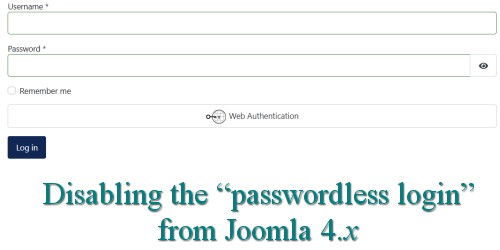
How to disable the “Web Authentication” option on the Joomla 4.x login screen?
- Information
- 4291 hits Updated: 28 June 2023 Blog
How to disable the “Web Authentication” option on the Joomla 4.x login screen?
Are you confused by the “Web Authentication” option on the Joomla 4.x login screen? I saw this question posted on The Joomla Forum™:
I want to hide the button for “web authentication” on the front end on the login page. [If I login normally and go to the user profile page I see] “W3C Web Authentication (WebAuthn) Login-W3C Web Authentication (WebAuthn) Login. No WebAuthn authenticator has been set up yet” I think it is confusing for a novice who tries to log in. How do I hide it?forum user, Joomla Forum, 25-Nov-2021
The following points need to be kept in mind:
- People will not see the “web authentication” option on the login page unless the website uses HTTPS with a valid security certificate. If you have just created a J! 4.x website using Wampserver for example, you may not see the option at all.
- The feature is not supported by all web browsers.
- The feature was not present in J! 4.0; the feature was added in J! 4.1.
- The feature is always present (even if you or your website users do not require it).
- In order to use the feature, you need to set up a “WebAuthn authenticator”. What’s that, you may ask? You can read all about it at WebAuthn Passwordless Login.
Does all of this sound complicated? Do I need it? Relax.
- Details
- Category: Blog
- Hits: 2096
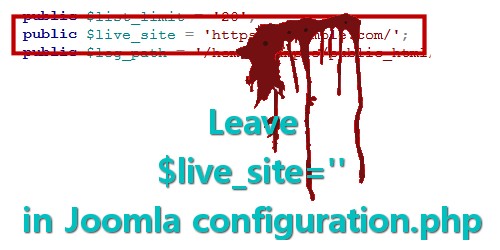
Leave $live_site='' in Joomla configuration.php
- Information
- 2096 hits Updated: 11 July 2025 Blog
What is does this \(live_site thing do?
Be wary about “official documentation”
Some advice for people who use Akeeba Backup
There's a setting in the J! configuration file that has been there since J! 1.0; in a brand-new J! 4.x installation you will find it at around line 40 and it looks like this
public \)live_site = '';
The [Forum Post Assistant tool] sometimes reports "Live Site is not empty" and experts here say it should be and to edit configuration.php to make it empty. I have looked through the core Joomla code and … see that live_site is reported in the System Information » Configuration File tab. [A non-empty value turns all URLs into 'garbage' that] makes the site unusable … but there is no place where it is set within Joomla.
I guess this is for some special purpose known only to a few. Can anyone explain the intended use of this parameter? How is it set other than by editing configuration.php?forum user, Joomla Forum, 15-Apr-2022
There is no mechanism within Joomla that allows a website owner to change this value. If people have a different value for \(live_site it is because they have edited the file configuration.php themselves. There are literally hundreds of posts on technical forums that discuss problems people have with using a non-null value for \)live_site. Hundreds of posts! So, why do people use a non-null value for $live_site especially when there’s no mechanism with J! to set or change it?
- Details
- Category: Blog
- Hits: 3295
How to fix missing items in Joomla Components menu
- Information
- 3295 hits Updated: 26 June 2023 Blog
“Missing” items in the Components menu; what causes this to happen and how to fix the problem
In this article we will investigate a common problem with Joomla website administration, the case of “missing” items in the Components menu. Here is a typical question we see posted on various technical discussion forums
[I am] trying to update Joomla 3.8.7 to latest using the link that [my] site sent to me ... [but] I don't seem to have a Joomla! Update [item] in the Components list.forum user, Joomla Forum, 20-Nov-2020
There are several reasons why this problem occurs. The most common reason is because of “corrupted” entries in the _menu table. There may be other causes but it is beyond the scope of this article to discuss them here.
- Details
- Category: Blog
- Hits: 4393
Absurdly wrong PHP settings that people use … and wonder why they have problems!
- Information
- 4393 hits Updated: 26 June 2023 Blog
Everything is “fine” … except it isn’t
Four important PHP settings
Max. input time
Max. Upload Size
Max. POST Size
Memory Limit
You can create Joomla! websites just about anywhere; there are thousands of commercial webhosting services to showcase your work to the world. You can also host your websites using your own personal computer (before putting them “out there” on the world wide web). So why do so many seem to have people have trouble maintaining their Joomla! websites?
There are many products you can install on your PC—depending on the operating system—such as Wampserver, XAMPP, MAMP, LAMP.
See also Technical Requirements; for a comprehensive list of additional PHP environmental settings used with Joomla, please see Optional Technical Requirements for J! 3.x or Optional Technical Requirements for J! 4.x (whichever applies to your particular circumstances). Note that some of these “optional” requirements are actually needed!
I’ve lost track of the number of times I’ve seen people begging for help on technical forums, saying, “I created a J! website and everything was fine until I tried to add a new extension (or update the software … or change something). What could possibly be wrong?” When we find out more about their hosting environment we discover that it’s a shambles. Everything was not “fine” to begin with; if they’d made a couple of small changes to the hosting environment they wouldn’t have the mess that they now have. Does this sound like you? Would you like to know about four important PHP settings that can mean the difference between happy webcrafting and tear-your-hair-out frustration and misery? If this sounds like you this article may just be a life-saver.
I’ve written before about a few of the important things people can do to maintain their Joomla! websites. Let’s summarise a few important PHP settings that determine whether you can maintain your J! website or whether you can’t. The following table lists those settings (and my recommendations for how you should use them):

Next up, “Memory Limit = -1” …